SEANCE — Free Chorus and Ensemble Plugin (VST3, Windows)
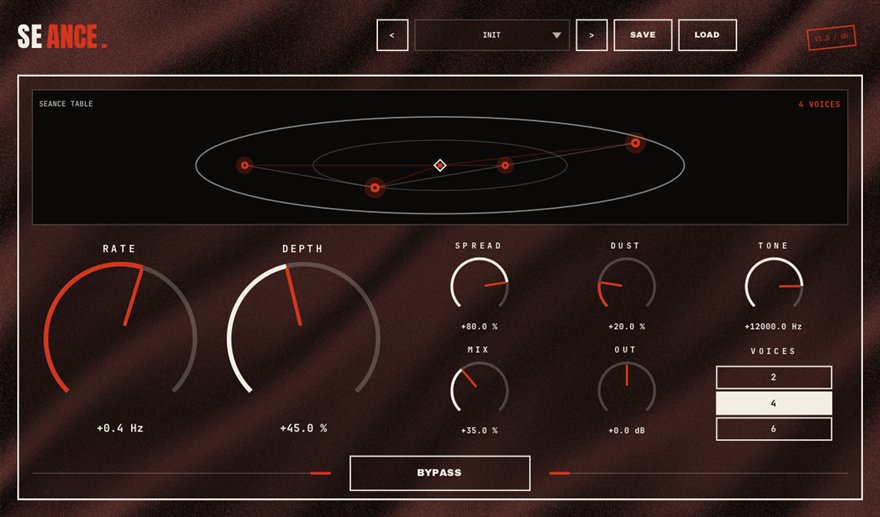
SEANCE is a free chorus and ensemble plugin for Windows 10/11 (64-bit), available as a VST3 and a standalone app. Two to six detuned voices orbit the stereo field, and a DUST control adds the slow, irregular drift of dying hardware. Lush on pads, thick on guitars, ghostly on vocals, and you can watch the voices circle the table on the display. It is part of BSMT.DSP, the free suite by Dr.dawgOG, a hip-hop producer from Anand, Gujarat.
What SEANCE does
A chorus makes one sound feel like several by mixing it with slightly delayed, slightly detuned copies of itself, the way a choir or a string section is never perfectly in tune. Classic hardware choruses from the 1980s did this with bucket-brigade chips whose clocks wobbled and aged, and that imperfection is a large part of why they sound alive. SEANCE gives you two to six of those detuned voices, spread and rotating around the stereo field rather than sitting still.
DUST is the aging control. At zero the modulation is smooth and clean; raise it and each voice drifts slowly and irregularly, like a chorus unit whose capacitors are giving up, which stops the effect from sounding like a plugin preset. The display draws the voices circling the table so you can see how wide and how fast the ensemble is moving before you commit.
Pads, sampled guitars, keys and ghostly vocals
On synth pads and Rhodes-style keys, four to six voices with moderate DUST is the instant 1980s-record sound that sits under boom bap and lo-fi beats. On sampled or recorded guitar, two or three voices with low depth thickens the part without smearing the attack. On vocals, a subtle two-voice SEANCE behind a XEROX double adds a ghostly halo to hooks and outros; keep it low in the mix so the lead stays dry and readable.
Because SEANCE is stereo-aware, check the result with WINGSPAN's MONO button when it is on a bus, since wide modulated voices can soften in mono. SEANCE runs as a VST3 in FL Studio, Ableton Live, Reaper, Studio One, Cubase and Bitwig on Windows.
How to use SEANCE
- Insert SEANCE on the pad, keys, guitar or vocal track.
- Choose the number of voices: two for subtle thickening, six for a full ensemble.
- Set depth and rate by ear, then add DUST until the modulation stops sounding perfectly regular.
- Watch the display to judge width and speed, and check the bus in mono if the chorus sits on a stereo mix element.
SEANCE features
- Two to six detuned voices orbiting the stereo field
- DUST adds the slow irregular drift of aging hardware
- Ensemble, chorus and subtle doubling from one plugin
- Display shows the voices circling in real time
- Suited to pads, guitars, keys and hook vocals
- VST3 and standalone for Windows 10/11 64-bit, free with no signup
SEANCE vs the alternatives
How SEANCE compares with the free and paid chorus / ensemble plugins producers usually shortlist. The row for SEANCE is highlighted.
| Plugin | Price | Windows formats | Notes |
|---|---|---|---|
| SEANCE (BSMT.DSP) | Free, no signup | VST3, standalone | Two to six orbiting voices with DUST hardware drift and a live display |
| TAL-Chorus-LX | Free | VST2, VST3, AAX | Faithful Juno-style two-mode chorus, no voice count control |
| Baby Audio Magic Switch | Free | VST2, VST3, AAX | One-button vintage chorus, deliberately minimal |
| Arturia Chorus JUN-6 | Paid | VST2, VST3, AAX | Paid anchor: detailed emulation of the classic synth chorus |
Formats listed for Windows only, as published by each vendor in August 2026.
SEANCE specs
| Plugin | SEANCE (chorus / ensemble) |
| Category | TIME & SPACE |
| Price | Free. No account, no email, no trial, no watermark. |
| Formats | VST3 (64-bit) and a standalone app |
| Operating system | Windows 10 / Windows 11, 64-bit. macOS build in progress (the download button switches when it ships). |
| Works in | FL Studio, Ableton Live, Reaper, Studio One, Cubase, Bitwig and any other VST3 host on Windows |
| Installer | One BSMT.DSP installer for all 27 plugins; tick the ones you want. It detects and updates older versions in place. |
| Version | Shown on the download button, fetched live from the releases repository. |
| Developer | Dr.dawgOG (BSMT.DSP), Anand, Gujarat, India |
| Support the project | buymeacoffee.com/dawgog (optional) |
SEANCE FAQ
What is the difference between chorus and ensemble?
Chorus usually means two or three modulated voices; ensemble means more voices with slower, richer movement, the string-machine sound. SEANCE covers both by letting you choose two to six voices and how much they drift.
How do I get the 80s synth chorus sound?
Put SEANCE on the pad or keys, use four or more voices, medium depth, a slow rate and a little DUST so the modulation wobbles like aging hardware. Keep the low end out of the chorus if the part carries bass.
Can I use chorus on rap vocals?
Sparingly. A subtle two-voice SEANCE on a hook double or an outro adds a haunted width; on a lead verse it blurs the words. Use XEROX for doubling first and add SEANCE only for color.
Is SEANCE really free?
Yes. Completely free, no account, no email gate, no trial. It is part of the BSMT.DSP installer on GitHub Releases, and you can install just SEANCE.
Does SEANCE work in FL Studio, Ableton Live and Reaper?
It does. SEANCE is a 64-bit VST3 for Windows 10/11 and works in FL Studio, Ableton Live, Reaper, Studio One, Cubase, Bitwig and any other VST3 host on Windows.
Install, SmartScreen and Mac questions are answered on the BSMT.DSP suite FAQ.
More from BSMT.DSP
See all 27 free BSMT.DSP plugins, the guide to mixing rap vocals with free plugins, and the list of free alternatives to paid vocal plugins. Need the vocal mixed by the person who built these? Mixing and mastering is open.