WINGSPAN — Free Stereo Widener and Imager Plugin (VST3, Windows)
WINGSPAN is a free stereo widener and imager plugin for Windows 10/11 (64-bit), available as a VST3 and a standalone app. It uses two-zone width: keep the low end tight and mono-safe while the highs stretch wide. A goniometer, a correlation history and a MONO check button tell you the truth about phone speakers before your listeners find out, and SAFE mode auto-guards against phase cancellation. It is part of BSMT.DSP, the free suite by Dr.dawgOG, a mix engineer from Anand, Gujarat.
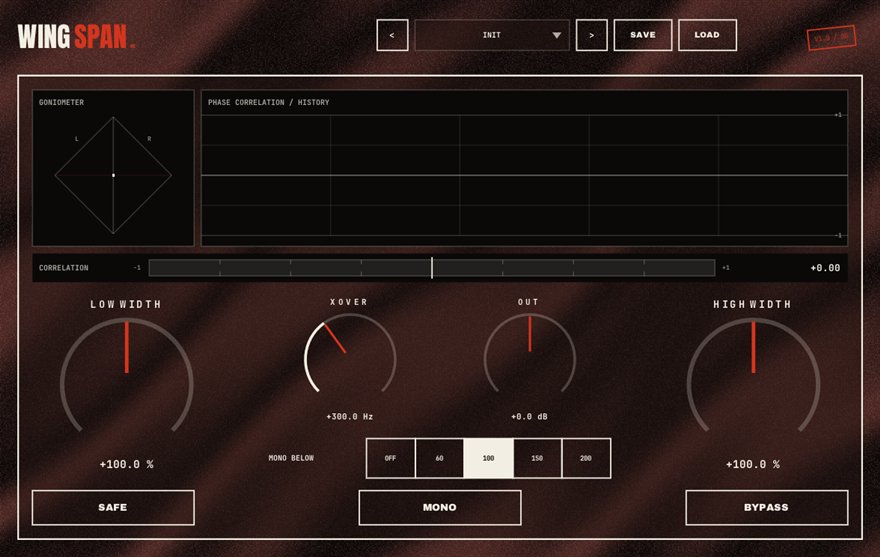
What WINGSPAN does
Stereo width is a trade. Push a sound wider and it feels bigger on headphones, but the parts of the signal that differ between left and right cancel when a phone, a Bluetooth speaker or a club system sums to mono. Widen the bass and the kick and 808 can vanish on those systems. WINGSPAN splits the job into two zones: below a crossover the signal stays tight and can be forced to mono, above it the width control opens the highs up. That is how professional masters get wide without getting hollow.
The metering is the real product. The goniometer draws the stereo field as a shape so you can see width and imbalance; the correlation history scrolls the phase correlation over time, where anything drifting toward zero or negative is a mono-compatibility warning. The MONO button lets you hear the sum instantly, and SAFE mode watches the correlation and automatically pulls the width back before cancellation happens.
Widening beats, hooks and masters safely
On a full beat or a master, set the crossover around 120 to 150 Hz, leave the low zone mono and widen the high zone a little at a time while watching the correlation history. If the meter dips, you have gone too far. On a stacked hook doubled with XEROX, WINGSPAN spreads the doubles further than panning alone while the MONO check confirms the lead still sits in the middle.
On sampled loops that arrive narrow or dead mono, a modest high-zone widening adds air without inventing false stereo in the bass. WINGSPAN runs as a VST3 in FL Studio, Ableton Live, Reaper, Studio One, Cubase and Bitwig on Windows, and the standalone app works as a stereo meter for reference tracks.
How to use WINGSPAN
- Insert WINGSPAN on the master, the beat bus or a hook stack.
- Set the crossover so the low zone contains the kick and 808, and mono that zone.
- Widen the high zone gradually while watching the goniometer and the correlation history.
- Press MONO to hear the phone-speaker version, and leave SAFE mode on so the width never tips into cancellation.
WINGSPAN features
- Two-zone width: mono-safe lows, wide highs, with an adjustable crossover
- Goniometer that draws the stereo field in real time
- Correlation history to catch mono-compatibility problems over time
- MONO check button for an instant phone-speaker reality check
- SAFE mode auto-guards against phase cancellation
- VST3 and standalone for Windows 10/11 64-bit, free with no signup
WINGSPAN vs the alternatives
How WINGSPAN compares with the free and paid stereo imager plugins producers usually shortlist. The row for WINGSPAN is highlighted.
| Plugin | Price | Windows formats | Notes |
|---|---|---|---|
| WINGSPAN (BSMT.DSP) | Free, no signup | VST3, standalone | Two-zone width with goniometer, correlation history, MONO check and SAFE mode |
| iZotope Ozone Imager 2 | Free (account required) | VST2, VST3, AAX | Single-band widener with vectorscope; multiband imaging is in the paid Ozone |
| Polyverse Wider | Free | VST2, VST3, AAX | Mono-compatible widening trick, no metering suite |
| Voxengo MSED | Free | VST2, VST3, AAX | Mid/side encoder and width tool, no multi-zone or safety mode |
Formats listed for Windows only, as published by each vendor in August 2026.
WINGSPAN specs
| Plugin | WINGSPAN (stereo imager) |
| Category | TIME & SPACE |
| Price | Free. No account, no email, no trial, no watermark. |
| Formats | VST3 (64-bit) and a standalone app |
| Operating system | Windows 10 / Windows 11, 64-bit. macOS build in progress (the download button switches when it ships). |
| Works in | FL Studio, Ableton Live, Reaper, Studio One, Cubase, Bitwig and any other VST3 host on Windows |
| Installer | One BSMT.DSP installer for all 27 plugins; tick the ones you want. It detects and updates older versions in place. |
| Version | Shown on the download button, fetched live from the releases repository. |
| Developer | Dr.dawgOG (BSMT.DSP), Anand, Gujarat, India |
| Support the project | buymeacoffee.com/dawgog (optional) |
WINGSPAN FAQ
Why does my mix sound wide on headphones but weak on a phone?
Because phone and Bluetooth speakers sum to mono, and anything that differs between left and right cancels. WINGSPAN keeps the low end mono, widens only the highs and shows you the correlation so the mix survives the sum. Press its MONO button to hear the phone version before you release.
Should I widen the bass?
No. Keep everything under roughly 120 to 150 Hz in mono so the kick and 808 stay solid on club systems and single speakers. WINGSPAN's two-zone design does this by default: the low zone stays tight while the high zone goes wide.
What does the correlation meter tell me?
How similar the left and right channels are. Plus one is mono, zero is fully independent, negative means cancellation when summed. WINGSPAN scrolls the correlation over time so a brief problem in one section does not slip past you.
Is WINGSPAN really free?
Yes. Completely free, no account, no email gate, no trial. It ships inside the BSMT.DSP installer on GitHub Releases and can be installed alone.
Does WINGSPAN work in FL Studio and Ableton Live?
It does. WINGSPAN is a 64-bit VST3 for Windows 10/11 and loads in FL Studio, Ableton Live, Reaper, Studio One, Cubase, Bitwig and any other VST3 host, with a standalone app for metering reference tracks.
Install, SmartScreen and Mac questions are answered on the BSMT.DSP suite FAQ.
More from BSMT.DSP
See all 27 free BSMT.DSP plugins, the guide to mixing rap vocals with free plugins, and the list of free alternatives to paid vocal plugins. Need the vocal mixed by the person who built these? Mixing and mastering is open.