FURNACE — Free Saturation Plugin: Tape, Tube and Transformer (VST3, Windows)
FURNACE is a free saturation plugin for Windows 10/11 (64-bit), available as a VST3 and a standalone app. Three flavors of heat at 4x oversampling: TAPE glue, TUBE's even-harmonic bloom and IRON's transformer weight. BIAS skews the waveform for vintage asymmetry, TIGHT lets the lows through clean while everything above burns, and AUTO gain means drive adds color, not just volume. It is part of BSMT.DSP, the free suite by Dr.dawgOG, a mix engineer from Anand, Gujarat.
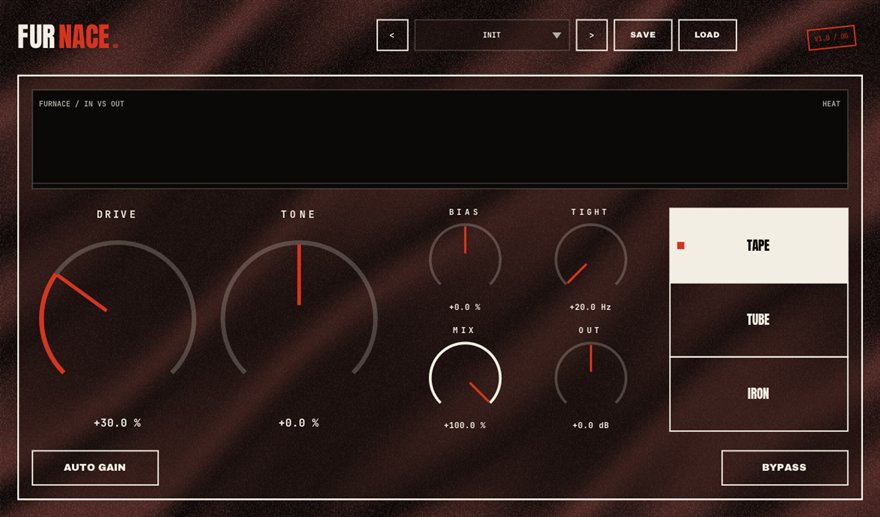
What FURNACE does
Saturation is controlled distortion: pushing a signal into a nonlinear circuit adds harmonics that make it sound louder, warmer and more present without the meter moving much. Different circuits add different harmonics, which is why engineers talk about tape, tube and transformer as three separate colors. FURNACE models all three. TAPE compresses and glues, softening peaks the way a saturated reel does. TUBE adds the even-harmonic bloom that flatters vocals and keys. IRON adds the low-mid weight and edge of a driven transformer, the rap-vocal and drum-bus flavor.
Three controls keep it musical. BIAS skews the waveform asymmetrically, the way real vintage circuits do, which adds the second-harmonic character that sounds expensive. TIGHT keeps the low end clean while everything above the crossover burns, so an 808 stays solid while the mids get heat. And AUTO gain compensates output as you add drive, so you judge the color, not the loudness. Four times oversampling keeps aliasing out of the harmonics.
Vocals, drums, 808s and the mix bus
On a rap vocal, TUBE at a low drive setting after compression adds presence and a little forgiveness on harsh consonants; IRON with more drive turns a soft delivery aggressive. On a drum bus, TAPE glues a chopped break together and rounds off clicky transients. On an 808, IRON with TIGHT engaged adds mid-range harmonics that read on phones while the sub stays clean underneath, a job it shares with BEDROCK.
On the mix bus, a whisper of TAPE with AUTO gain on is a classic finishing move before OVERBITE and CEILING. FURNACE runs as a VST3 in FL Studio, Ableton Live, Reaper, Studio One, Cubase and Bitwig on Windows.
How to use FURNACE
- Insert FURNACE on the vocal, drum bus, 808 or mix bus.
- Pick the flavor: TAPE for glue, TUBE for bloom, IRON for weight and edge.
- Raise drive with AUTO gain on so you hear the color change without a volume jump, and add BIAS for vintage asymmetry.
- Engage TIGHT on bass-heavy sources so the lows pass clean while the mids and highs saturate.
FURNACE features
- Three saturation flavors: TAPE, TUBE and IRON transformer
- 4x oversampling to keep aliasing out of the harmonics
- BIAS skews the waveform for vintage asymmetric character
- TIGHT keeps the low end clean while everything above burns
- AUTO gain so drive means color, not just louder
- VST3 and standalone for Windows 10/11 64-bit, free with no signup
FURNACE vs the alternatives
How FURNACE compares with the free and paid saturator plugins producers usually shortlist. The row for FURNACE is highlighted.
| Plugin | Price | Windows formats | Notes |
|---|---|---|---|
| FURNACE (BSMT.DSP) | Free, no signup | VST3, standalone | Tape, tube and transformer flavors with BIAS, TIGHT, AUTO gain and 4x oversampling |
| Klanghelm IVGI | Free | VST2, VST3, AAX | Excellent single-flavor saturator with asymmetry control |
| Softube Saturation Knob | Free (account required) | VST2, VST3, AAX | One-knob saturator with three tone modes |
| FabFilter Saturn 2 | Paid (around USD 154 list) | VST2, VST3, AAX | Paid anchor: multiband saturation with many circuit models |
Prices are vendor list prices as seen in August 2026. Formats listed for Windows only.
FURNACE specs
| Plugin | FURNACE (saturator) |
| Category | CHARACTER |
| Price | Free. No account, no email, no trial, no watermark. |
| Formats | VST3 (64-bit) and a standalone app |
| Operating system | Windows 10 / Windows 11, 64-bit. macOS build in progress (the download button switches when it ships). |
| Works in | FL Studio, Ableton Live, Reaper, Studio One, Cubase, Bitwig and any other VST3 host on Windows |
| Installer | One BSMT.DSP installer for all 27 plugins; tick the ones you want. It detects and updates older versions in place. |
| Version | Shown on the download button, fetched live from the releases repository. |
| Developer | Dr.dawgOG (BSMT.DSP), Anand, Gujarat, India |
| Support the project | buymeacoffee.com/dawgog (optional) |
FURNACE FAQ
What is the difference between tape, tube and transformer saturation?
Tape compresses and softens peaks, tube adds even harmonics that sound warm and full, and a driven transformer adds low-mid weight and edge. FURNACE models all three so you can pick the color per source instead of buying three plugins.
How do I add saturation to rap vocals without making them harsh?
Use FURNACE's TUBE flavor at a low drive after the compressor, keep AUTO gain on so you are not fooled by loudness, and let SOLVENT or MUZZLE handle any harshness the saturation brings forward.
Why does oversampling matter for saturation?
Saturation creates harmonics above the audible range. Without oversampling they fold back into the audible band as aliasing, which sounds brittle. FURNACE oversamples 4x so the harmonics stay musical.
Is FURNACE really free?
Yes. Completely free, no account, no email gate, no trial. It ships inside the BSMT.DSP installer on GitHub Releases, where you can install FURNACE alone.
Does FURNACE work in FL Studio and Ableton Live?
It does. FURNACE is a 64-bit VST3 for Windows 10/11 and loads in FL Studio, Ableton Live, Reaper, Studio One, Cubase, Bitwig and any other VST3 host, with a standalone app included.
Install, SmartScreen and Mac questions are answered on the BSMT.DSP suite FAQ.
More from BSMT.DSP
See all 27 free BSMT.DSP plugins, the guide to mixing rap vocals with free plugins, and the list of free alternatives to paid vocal plugins. Need the vocal mixed by the person who built these? Mixing and mastering is open.