ELEVATOR — Free Vocal Rider Plugin (VST3, Windows)
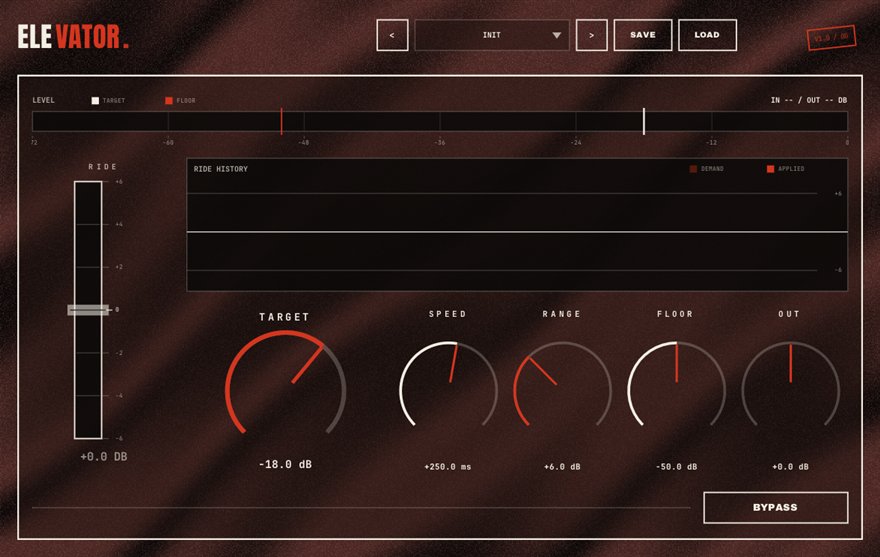
ELEVATOR is a free vocal rider plugin for Windows 10/11 (64-bit), delivered as a VST3 and a standalone app. Set a TARGET level and the fader rides every phrase to it, within a RANGE you allow and at a SPEED you choose; below the FLOOR it freezes, so breaths and room noise never get pulled up. It is a free alternative to Waves Vocal Rider and part of BSMT.DSP, the free 27-plugin suite by Dr.dawgOG, a hip-hop producer and mix engineer from Anand, Gujarat.
What ELEVATOR does
A vocal rider automates the fader for you. Instead of drawing hundreds of volume nodes so a rapper's quiet words match the loud ones, you tell the plugin the level you want and it moves the gain up or down, phrase by phrase, to land there. It is not a compressor: a compressor squashes the shape of every syllable, while a rider makes slow, musical gain moves that leave the performance's dynamics inside each word intact. Mix engineers usually do both, rider first, compressor second.
ELEVATOR has four decisions. TARGET is the level you want the vocal to sit at. RANGE limits how far the fader is allowed to travel up or down, so a whisper does not get yanked to shouting level. SPEED sets how quickly it reacts, from a lazy ride that follows sections to a fast one that follows words. FLOOR is the safety: below that level ELEVATOR freezes, so breaths, mouth noise and room tone between lines are never turned up into the mix.
Riding rap vocals before compression
Rap vocals move a lot: a rapper leans into the mic on the punchline and backs off on the setup. Put ELEVATOR first in the chain, after any de-breath work with WINDPIPE, and set TARGET so the average phrase sits where the beat needs it. Keep RANGE moderate, around six dB, so the delivery still has dynamics. Then KNUCKLE or MOUTHPIECE has a much easier job, because it no longer has to fix level and add character at the same time.
For sung hooks and melodic verses, slow the SPEED so the rider follows the melody's shape rather than each syllable. Raise FLOOR until the gaps between lines stop moving the fader. ELEVATOR runs as a VST3 in FL Studio, Ableton Live, Reaper, Studio One, Cubase and Bitwig on Windows, and it replaces the volume-automation lane you were going to draw.
How to use ELEVATOR
- Insert ELEVATOR early in the vocal chain, before the compressor.
- Set TARGET to the level you want the average phrase to sit at while the beat plays.
- Set RANGE to the maximum gain travel you will allow, then adjust SPEED: faster for rap, slower for singing.
- Raise FLOOR until breaths and room noise between lines no longer get lifted.
ELEVATOR features
- TARGET level the rider aims every phrase at
- RANGE limits how far the fader may travel up or down
- SPEED sets reaction time from section-slow to word-fast
- FLOOR freezes the rider on breaths and room noise
- Replaces hand-drawn volume automation on vocals
- VST3 and standalone for Windows 10/11 64-bit, free with no signup
ELEVATOR vs the alternatives
How ELEVATOR compares with the free and paid automatic vocal rider plugins producers usually shortlist. The row for ELEVATOR is highlighted.
| Plugin | Price | Windows formats | Notes |
|---|---|---|---|
| ELEVATOR (BSMT.DSP) | Free, no signup | VST3, standalone | Target, range, speed and floor controls; freezes below the floor so noise is never lifted |
| Waves Vocal Rider | Paid (around USD 38 at time of writing) | VST3, AAX | The category's paid anchor, with a music sidechain input |
| Casa Occidente Vocal Rider | Free | VST3 | Simple free rider from a small developer |
| Hand-drawn volume automation | Free (your time) | Any DAW | Total control, but hours per song and it breaks the moment a take is re-recorded |
Prices as seen on vendor pages in August 2026; Waves pricing changes with sales. Formats listed for Windows only.
ELEVATOR specs
| Plugin | ELEVATOR (automatic vocal rider) |
| Category | VOCALS |
| Price | Free. No account, no email, no trial, no watermark. |
| Formats | VST3 (64-bit) and a standalone app |
| Operating system | Windows 10 / Windows 11, 64-bit. macOS build in progress (the download button switches when it ships). |
| Works in | FL Studio, Ableton Live, Reaper, Studio One, Cubase, Bitwig and any other VST3 host on Windows |
| Installer | One BSMT.DSP installer for all 27 plugins; tick the ones you want. It detects and updates older versions in place. |
| Version | Shown on the download button, fetched live from the releases repository. |
| Developer | Dr.dawgOG (BSMT.DSP), Anand, Gujarat, India |
| Support the project | buymeacoffee.com/dawgog (optional) |
ELEVATOR FAQ
Is there a free vocal rider plugin?
Yes. ELEVATOR is a free vocal rider for Windows, available as a VST3 and standalone app inside BSMT.DSP. It rides vocal level to a target within a range and speed you set, and it needs no account or email to download.
What is the difference between a vocal rider and a compressor?
A compressor reacts to peaks in milliseconds and changes the shape of each syllable. A vocal rider makes slow gain moves, phrase by phrase, like an engineer's hand on the fader. Riders control level; compressors control dynamics and add character. Use ELEVATOR first, then KNUCKLE or MOUTHPIECE.
Is ELEVATOR a free alternative to Waves Vocal Rider?
It covers the same job: automatic vocal leveling to a target with range and speed control, plus a floor that stops noise from being pulled up. Waves adds a music sidechain input; ELEVATOR is free with no signup and Windows VST3.
Will ELEVATOR turn up breaths and room noise?
Not if you set the FLOOR. Below the floor level the rider freezes, so breaths, mouth noise and room tone between lines stay where they were. For breath control itself, pair it with WINDPIPE.
Does ELEVATOR work in FL Studio and Ableton Live?
Yes. ELEVATOR is a 64-bit VST3 for Windows 10/11 and works in FL Studio, Ableton Live, Reaper, Studio One, Cubase, Bitwig and any other VST3 host, with a standalone app included.
Install, SmartScreen and Mac questions are answered on the BSMT.DSP suite FAQ.
More from BSMT.DSP
See all 27 free BSMT.DSP plugins, the guide to mixing rap vocals with free plugins, and the list of free alternatives to paid vocal plugins. Need the vocal mixed by the person who built these? Mixing and mastering is open.