WINDPIPE — Free Breath Control Plugin for Vocals (VST3, Windows)
WINDPIPE is a free breath control plugin for Windows 10/11 (64-bit), available as a VST3 and a standalone app. It detects breaths by their level, texture and noisiness, never by guesswork, and ducks them by exactly the amount you choose; push REDUCTION positive and it boosts them instead for close-mic intimacy. LISTEN mode plays only what it flagged so you can trust it. It is a free alternative to Waves DeBreath and part of BSMT.DSP, the free suite by Dr.dawgOG, a mix engineer from Anand, Gujarat.
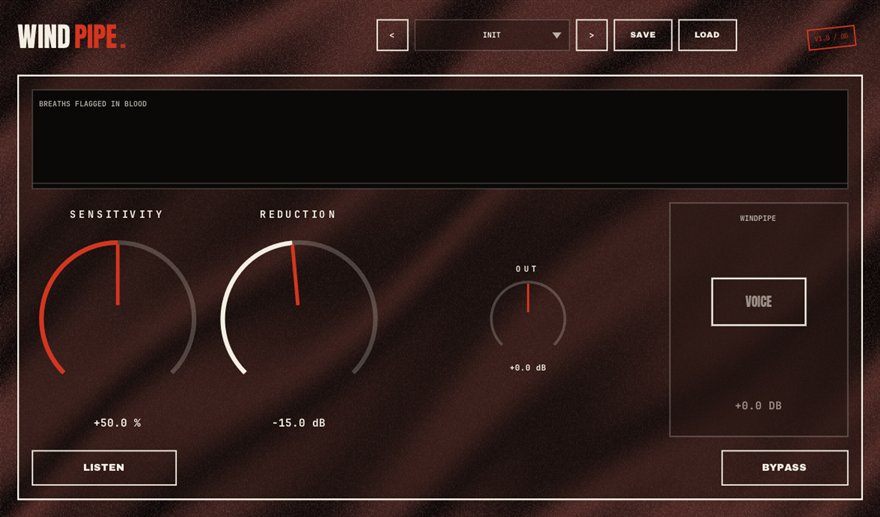
What WINDPIPE does
Every vocal take is full of breaths, and compression makes them louder. Engineers traditionally remove them by hand, clip by clip, or with a gate that also chops the ends of words. A breath control plugin detects the breaths automatically and turns them down. WINDPIPE detects them on three signals at once, level, texture and noisiness, so it can tell a breath from a quiet word, which is where simple gates and level-only detectors fail.
REDUCTION sets how far each detected breath is turned down, from a subtle tuck to near silence. Push it positive and WINDPIPE boosts the breaths instead, which is the close-mic, whispered, intimate sound used on some hooks and on spoken intros. LISTEN mode solos only the audio WINDPIPE has flagged as breath, the honesty check: if you hear words in LISTEN mode, ease the sensitivity; if you hear nothing but breaths, you can trust the setting across the whole song.
Cleaning rap and sung vocals without editing
Put WINDPIPE right after the gate and before the vocal rider and compressor. On a rap verse, a moderate REDUCTION keeps the breaths present but polite, which sounds more natural than deleting them; on a sung hook that will be compressed hard and doubled, reduce them further so the stack does not turn into a chorus of gasps. Use LISTEN once per song to confirm the detection, then leave it.
For the ASMR-style intimacy on a slow record, push REDUCTION positive so the breaths sit close and forward. WINDPIPE runs as a VST3 in FL Studio, Ableton Live, Reaper, Studio One, Cubase and Bitwig on Windows, and it replaces an hour of manual breath editing per song.
How to use WINDPIPE
- Insert WINDPIPE after the gate and before ELEVATOR and the compressor on the vocal chain.
- Press LISTEN and play the verse; adjust sensitivity until you hear only breaths and no words.
- Set REDUCTION to how far the breaths should drop, from a light tuck to near silence.
- For a close-mic intimate sound, push REDUCTION positive to boost the breaths instead.
WINDPIPE features
- Detects breaths by level, texture and noisiness, not guesswork
- REDUCTION ducks each breath by exactly the amount you choose
- Positive REDUCTION boosts breaths for close-mic intimacy
- LISTEN mode plays only what was flagged as breath
- Replaces manual clip-by-clip breath editing
- VST3 and standalone for Windows 10/11 64-bit, free with no signup
WINDPIPE vs the alternatives
How WINDPIPE compares with the free and paid breath control plugins producers usually shortlist. The row for WINDPIPE is highlighted.
| Plugin | Price | Windows formats | Notes |
|---|---|---|---|
| WINDPIPE (BSMT.DSP) | Free, no signup | VST3, standalone | Three-signal breath detection, reduce or boost, LISTEN monitoring |
| Waves DeBreath | Paid (around USD 28 at time of writing) | VST3, AAX | The long-standing paid breath-removal plugin |
| iZotope RX Breath Control | Paid (part of RX) | VST3, AAX | Breath control module inside the RX audio repair suite |
| Noise gate or manual editing | Free (your time) | Any DAW | A gate chops word endings; manual editing works but costs an hour per song |
Prices as seen on vendor pages in August 2026; Waves pricing changes with sales. Formats listed for Windows only.
WINDPIPE specs
| Plugin | WINDPIPE (breath control) |
| Category | VOCALS |
| Price | Free. No account, no email, no trial, no watermark. |
| Formats | VST3 (64-bit) and a standalone app |
| Operating system | Windows 10 / Windows 11, 64-bit. macOS build in progress (the download button switches when it ships). |
| Works in | FL Studio, Ableton Live, Reaper, Studio One, Cubase, Bitwig and any other VST3 host on Windows |
| Installer | One BSMT.DSP installer for all 27 plugins; tick the ones you want. It detects and updates older versions in place. |
| Version | Shown on the download button, fetched live from the releases repository. |
| Developer | Dr.dawgOG (BSMT.DSP), Anand, Gujarat, India |
| Support the project | buymeacoffee.com/dawgog (optional) |
WINDPIPE FAQ
Is there a free breath control plugin?
Yes. WINDPIPE is a free breath control plugin for Windows, delivered as a VST3 and standalone app inside BSMT.DSP. It detects breaths automatically and reduces or boosts them, and it needs no account or email to download.
Is WINDPIPE a free alternative to Waves DeBreath?
It does the same job: automatic breath detection with adjustable reduction, plus the ability to boost breaths for an intimate sound and a LISTEN mode to audit what it caught. WINDPIPE is free with no signup as a Windows VST3.
Should I remove breaths from rap vocals completely?
Usually not. Breaths are part of the delivery and removing them completely sounds robotic. Tuck them a few dB with WINDPIPE on verses and reduce them harder on heavily compressed, doubled hooks.
How do I know WINDPIPE is only catching breaths?
Use LISTEN mode. It solos only the audio flagged as breath, so if you hear words, lower the sensitivity until you hear breaths alone. One pass per song is enough.
Does WINDPIPE work in FL Studio, Ableton Live and Reaper?
It does. WINDPIPE is a 64-bit VST3 for Windows 10/11 and works in FL Studio, Ableton Live, Reaper, Studio One, Cubase, Bitwig and any other VST3 host on Windows.
Install, SmartScreen and Mac questions are answered on the BSMT.DSP suite FAQ.
More from BSMT.DSP
See all 27 free BSMT.DSP plugins, the guide to mixing rap vocals with free plugins, and the list of free alternatives to paid vocal plugins. Need the vocal mixed by the person who built these? Mixing and mastering is open.