MUZZLE — Free De-Esser Plugin (VST3, Windows)
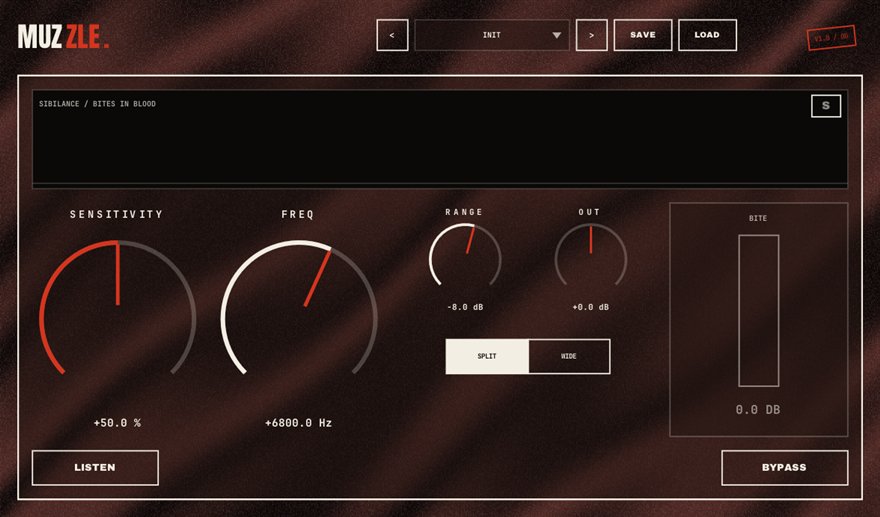
MUZZLE is a free de-esser plugin for Windows 10/11 (64-bit), available as a VST3 and a standalone app. It controls sibilance by measuring esses against the vocal's own level, so one setting survives every gain change. SPLIT mode bites only the harsh band, WIDE ducks everything the old-school way, and the S-lamp and BITE meter show every clamp as it happens. It is part of BSMT.DSP, the free 27-plugin suite by Dr.dawgOG, a hip-hop producer and mix engineer from Anand, Gujarat.
What MUZZLE does
Sibilance is the sharp hiss on S, T and CH sounds that a close microphone exaggerates and compression makes worse. A de-esser is a compressor that listens only to that high band and turns it down for the split second an ess lasts. The classic problem with de-essers is that the threshold is absolute: set it for a quiet verse and the loud hook spits, set it for the hook and the verse lisps. MUZZLE measures each ess relative to the vocal's own level at that moment, so one setting keeps working when the rapper gets loud, when you change the gain staging, and across the whole song.
SPLIT mode bites only the harsh frequency band, leaving the body of the word untouched, which is the transparent modern approach. WIDE mode ducks the whole signal for the duration of the ess, the old-school broadband method that some vocals prefer. The S-lamp flashes on every detected ess and the BITE meter shows how much was clamped, so you can see the de-esser working instead of guessing whether it is doing anything.
De-essing rap vocals in the right order
Put MUZZLE early in the chain, after the gate and before the compressor, because compression brings sibilance forward and it is easier to catch esses before they are pushed. Start in SPLIT mode, raise the amount until the S-lamp fires on the harsh esses and not on ordinary words, then check the BITE meter: two to six dB of reduction on an ess is normal, more usually means the microphone or the room needs a look. Rappers with a lot of air in their delivery sometimes sound more natural in WIDE mode.
Because the detection is level-relative, you can re-balance the vocal, add a saturator like FURNACE or turn up the input later without coming back to re-tune MUZZLE. It runs as a VST3 in FL Studio, Ableton Live, Reaper, Studio One, Cubase and Bitwig on Windows, and the standalone app works for checking a recorded take.
How to use MUZZLE
- Insert MUZZLE after the gate and before the compressor on the vocal chain.
- Choose SPLIT to bite only the harsh band, or WIDE to duck the whole signal on each ess.
- Raise the amount until the S-lamp lights on real esses and stays dark on normal words.
- Read the BITE meter: a few dB per ess is right; if it clamps constantly, lower the amount or fix the source.
MUZZLE features
- Level-relative detection: one setting survives every gain change
- SPLIT mode bites only the harsh band
- WIDE mode ducks the whole signal, old-school style
- S-lamp flashes on every detected ess
- BITE meter shows exactly how much was clamped
- VST3 and standalone for Windows 10/11 64-bit, free with no signup
MUZZLE vs the alternatives
How MUZZLE compares with the free and paid de-esser plugins producers usually shortlist. The row for MUZZLE is highlighted.
| Plugin | Price | Windows formats | Notes |
|---|---|---|---|
| MUZZLE (BSMT.DSP) | Free, no signup | VST3, standalone | Level-relative detection, SPLIT and WIDE modes, S-lamp and BITE meter |
| Techivation T-De-Esser 2 | Free | VST3, AAX | Well-regarded modern free de-esser |
| Spitfish (digitalfishphones) | Free | VST2, 32-bit | The 2005 classic; needs a bridge in modern 64-bit DAWs |
| FabFilter Pro-DS | Paid (around USD 169 list) | VST2, VST3, AAX | Paid anchor: lookahead, single-vocal detection, mid/side |
Prices are vendor list prices as seen in August 2026. Formats listed for Windows only.
MUZZLE specs
| Plugin | MUZZLE (de-esser) |
| Category | VOCALS |
| Price | Free. No account, no email, no trial, no watermark. |
| Formats | VST3 (64-bit) and a standalone app |
| Operating system | Windows 10 / Windows 11, 64-bit. macOS build in progress (the download button switches when it ships). |
| Works in | FL Studio, Ableton Live, Reaper, Studio One, Cubase, Bitwig and any other VST3 host on Windows |
| Installer | One BSMT.DSP installer for all 27 plugins; tick the ones you want. It detects and updates older versions in place. |
| Version | Shown on the download button, fetched live from the releases repository. |
| Developer | Dr.dawgOG (BSMT.DSP), Anand, Gujarat, India |
| Support the project | buymeacoffee.com/dawgog (optional) |
MUZZLE FAQ
What does a de-esser do?
It detects the sharp S, T and CH sounds in a vocal and turns them down for the split second they last, so the vocal can be bright and compressed without spitting. MUZZLE does this with level-relative detection so the setting holds across quiet verses and loud hooks.
Where does the de-esser go in the vocal chain?
Before the compressor. Compression makes sibilance louder, so catching it first with MUZZLE means the compressor and any saturation you add later never exaggerate it.
Is there a free de-esser plugin for FL Studio?
Yes. MUZZLE is a free VST3 de-esser that loads in FL Studio on Windows, with no account or email required. It is part of the BSMT.DSP suite, and you can install just MUZZLE from the installer.
SPLIT or WIDE mode?
SPLIT for most vocals: it reduces only the harsh band and leaves the word intact. WIDE for airy or whispery deliveries where a broadband dip sounds more natural than a band cut. Flip between them while the S-lamp fires and keep the one you cannot hear working.
Does MUZZLE work in Ableton Live, Reaper and Studio One?
It does. MUZZLE is a 64-bit VST3 for Windows 10/11 and works in Ableton Live, Reaper, Studio One, Cubase, Bitwig and FL Studio, with a standalone app included.
Install, SmartScreen and Mac questions are answered on the BSMT.DSP suite FAQ.
More from BSMT.DSP
See all 27 free BSMT.DSP plugins, the guide to mixing rap vocals with free plugins, and the list of free alternatives to paid vocal plugins. Need the vocal mixed by the person who built these? Mixing and mastering is open.