SLINGSHOT — Free Vocal Delay Throw Plugin for Ad-Libs (VST3, Windows)
SLINGSHOT is a free vocal delay throw plugin for Windows 10/11 (64-bit), delivered as a VST3 and a standalone app. One giant THROW pad: hold it to fling a word into tempo-synced delay, reverb or both, release and the tail rings out on its own. Ping-pong bounce, darkening repeats and built-in ducking mean throws never bury the next line. It is part of BSMT.DSP, the free suite by Dr.dawgOG, a hip-hop producer and mix engineer from Anand, Gujarat.
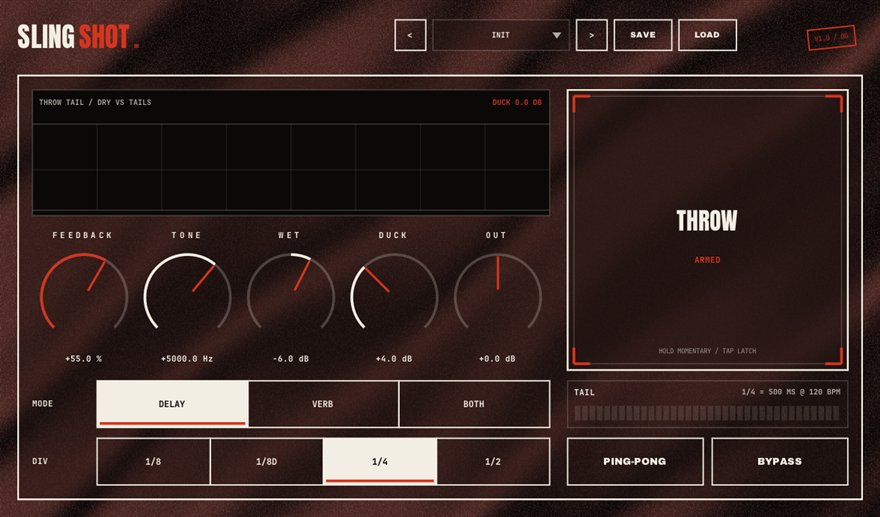
What SLINGSHOT does
A delay throw is the rap vocal effect where the last word of a line echoes into the gap: a word gets thrown into a delay for a beat, then the dry vocal continues clean. Engineers normally build it from an aux send, a delay on the return and an automation lane that opens the send for a fraction of a second. It works, but it means drawing automation for every throw on every song. SLINGSHOT turns the whole rig into one pad.
Hold THROW and whatever the vocal is saying at that moment is flung into a tempo-synced delay, a reverb, or both. Release and the effect stops catching new audio while the tail rings out. Hold for a momentary throw, tap to latch it on, or automate the pad from the DAW so it is repeatable on every playback. The repeats ping-pong and darken as they bounce, and a built-in ducker pulls the tail down as soon as the next line starts so the throw never steps on the words.
Ad-libs, hook ends and rap vocal FX
The everyday move: put SLINGSHOT on the lead vocal, set the delay to a quarter or dotted eighth, and tap THROW on the last word of every fourth bar. Because the ducker is built in, you can be generous with feedback and the verse stays clean. On ad-libs, latch THROW so every ad-lib flies into space, then let the darkening repeats fade under the beat.
For hook endings and transitions, hold the pad through the last phrase and let the reverb and delay bloom into the drop. Automating the pad from a DAW lane means the throws are locked to the arrangement and survive a re-bounce. SLINGSHOT runs as a VST3 in FL Studio, Ableton Live, Reaper, Studio One, Cubase and Bitwig on Windows, and the standalone app is useful for performing throws live.
How to use SLINGSHOT
- Insert SLINGSHOT directly on the lead vocal or ad-lib track; no send or return is needed.
- Choose delay, reverb or both, and sync the delay time to a quarter or dotted-eighth note.
- Hold THROW on the word you want to fling; release and the tail rings out while the next line stays dry.
- Tap to latch for ad-lib tracks, or automate the pad from your DAW so the throws land the same way every playback.
SLINGSHOT features
- One giant THROW pad: hold for momentary, tap to latch
- Tempo-synced delay, reverb or both
- Ping-pong bounce with repeats that darken as they fade
- Built-in ducking so throws never bury the next line
- Pad is automatable from the DAW for repeatable throws
- VST3 and standalone for Windows 10/11 64-bit, free with no signup
SLINGSHOT vs the alternatives
How SLINGSHOT compares with the free and paid ad-lib throw FX plugins producers usually shortlist. The row for SLINGSHOT is highlighted.
| Approach | Price | Windows formats | Notes |
|---|---|---|---|
| SLINGSHOT (BSMT.DSP) | Free, no signup | VST3, standalone | One pad, tempo sync, ping-pong, darkening repeats and ducking in a single insert |
| Aux send + delay + automation | Free (your time) | Any DAW | The traditional method: works, but needs a return track and an automation lane per throw |
| STAIRWELL on a send (BSMT.DSP) | Free, no signup | VST3, standalone | Tape-delay flavor for throws when you want to build the rig yourself |
| Valhalla Supermassive on a send | Free | VST2, VST3, AAX | Huge tails for hook-ending throws, still needs send automation |
Formats listed for Windows only, as published by each vendor in August 2026.
SLINGSHOT specs
| Plugin | SLINGSHOT (ad-lib throw FX) |
| Category | VOCALS |
| Price | Free. No account, no email, no trial, no watermark. |
| Formats | VST3 (64-bit) and a standalone app |
| Operating system | Windows 10 / Windows 11, 64-bit. macOS build in progress (the download button switches when it ships). |
| Works in | FL Studio, Ableton Live, Reaper, Studio One, Cubase, Bitwig and any other VST3 host on Windows |
| Installer | One BSMT.DSP installer for all 27 plugins; tick the ones you want. It detects and updates older versions in place. |
| Version | Shown on the download button, fetched live from the releases repository. |
| Developer | Dr.dawgOG (BSMT.DSP), Anand, Gujarat, India |
| Support the project | buymeacoffee.com/dawgog (optional) |
SLINGSHOT FAQ
What is a delay throw on a rap vocal?
It is the effect where a single word or phrase is sent into a delay or reverb for a moment so it echoes into the gap while the rest of the vocal stays dry. SLINGSHOT does it with one pad instead of a send, a return and an automation lane.
How do I do vocal throws in FL Studio without automation?
Load SLINGSHOT on the vocal, sync the delay, and hold the THROW pad on the word you want to echo. Tap it to latch for ad-lib tracks. You can still automate the pad if you want the throws locked to the arrangement.
Will the throws cover the next line?
No. SLINGSHOT has ducking built in: as soon as the next line starts, the tail is pulled down under the vocal and released again in the gap.
Is SLINGSHOT really free?
Yes. Completely free, no account, no email, no trial. It comes in the BSMT.DSP installer on GitHub Releases, and you can install just SLINGSHOT.
Does SLINGSHOT work in Ableton Live, Reaper and Studio One?
It does. SLINGSHOT is a 64-bit VST3 for Windows 10/11 and works in Ableton Live, Reaper, Studio One, Cubase, Bitwig and FL Studio. The standalone app lets you perform throws live with a microphone.
Install, SmartScreen and Mac questions are answered on the BSMT.DSP suite FAQ.
More from BSMT.DSP
See all 27 free BSMT.DSP plugins, the guide to mixing rap vocals with free plugins, and the list of free alternatives to paid vocal plugins. Need the vocal mixed by the person who built these? Mixing and mastering is open.