CROWBAR — Free Spectral Sidechain Ducker Plugin (VST3, Windows)
CROWBAR is a free spectral sidechain ducker for Windows 10/11 (64-bit), available as a VST3 and a standalone app. Put it on the beat, sidechain the vocal into it, and the beat ducks only the frequencies the vocal is using, only while the vocal is speaking, across 24 automatic spectral bands. A DELTA mode plays just what got removed. It is a free alternative to Wavesfactory TrackSpacer and part of BSMT.DSP, the free suite by Dr.dawgOG, a mix engineer from Anand, Gujarat.
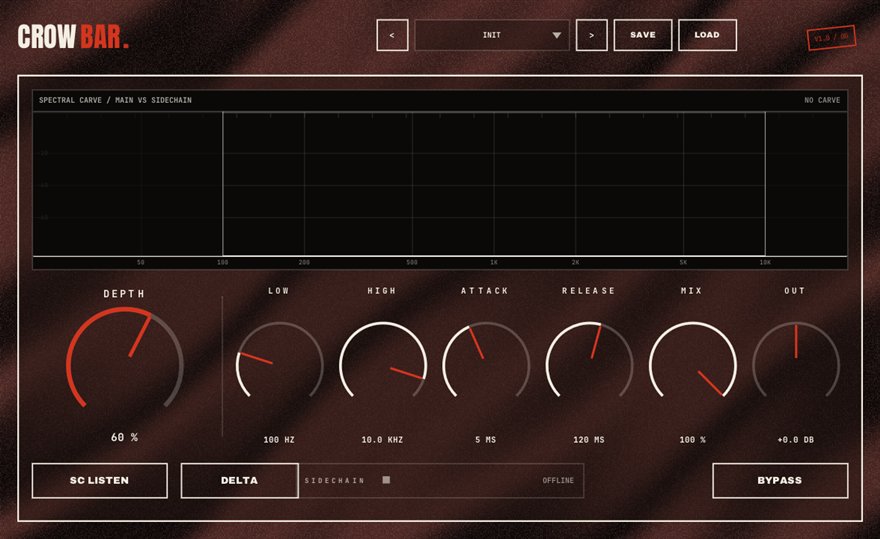
What CROWBAR does
The most common mix complaint in rap is that the vocal disappears under the beat. The usual fixes are blunt: turn the beat down, or carve a static EQ hole where the vocal lives, which leaves the beat sounding hollow even when the rapper is silent. Spectral sidechain ducking fixes it precisely. CROWBAR listens to the vocal through its sidechain input, works out which frequencies the voice is occupying at that instant, and dips only those frequencies in the beat, only while the vocal is present. When the rapper stops, the beat comes back whole.
It does this across 24 spectral bands that carve automatically, so you never draw a curve. The display shows exactly where the crowbar is prying at any moment, and the DELTA button plays only the audio being removed, which is the fastest way to set the amount: if delta sounds like the vocal's outline, you are right; if it sounds like the whole beat, back off.
Making a rap vocal sit on top of the beat
The standard setup takes a minute. Insert CROWBAR on the beat track or the instrumental bus, route the lead vocal to its sidechain input in your DAW, and raise the amount until the words come forward. Two to four dB of spectral ducking is usually invisible to the listener and obvious to the rapper. For a two-track beat with no stems, this is often the only tool that makes the vocal clear without EQ-ing the beat to death.
It also works between instruments: sidechain the 808 into CROWBAR on the sampled loop so the loop steps out of the way of the sub, or sidechain the snare into a pad. CROWBAR runs as a VST3 in FL Studio, Ableton Live, Reaper, Studio One, Cubase and Bitwig on Windows; each of those DAWs has a way to route a track into a plugin's sidechain input.
How to use CROWBAR
- Insert CROWBAR on the beat or instrumental bus, not on the vocal.
- Route the lead vocal into CROWBAR's sidechain input using your DAW's sidechain routing.
- Raise the amount until the vocal comes forward, watching the display to see which bands are being dipped.
- Press DELTA to hear only what is being removed and fine-tune until it sounds like the outline of the voice, not the beat.
CROWBAR features
- Spectral ducking across 24 automatic bands
- Ducks only the frequencies the sidechain source is using, only while it plays
- Live display of exactly where the crowbar is prying
- DELTA mode plays just what got removed
- Solves vocal-over-beat masking on two-track beats without static EQ holes
- VST3 and standalone for Windows 10/11 64-bit, free with no signup
CROWBAR vs the alternatives
How CROWBAR compares with the free and paid sidechain spectral ducker plugins producers usually shortlist. The row for CROWBAR is highlighted.
| Plugin | Price | Windows formats | Notes |
|---|---|---|---|
| CROWBAR (BSMT.DSP) | Free, no signup | VST3, standalone | 24-band spectral ducking with sidechain input, live display and DELTA monitoring |
| Wavesfactory TrackSpacer | Paid (around USD 59 list) | VST2, VST3, AAX | The paid anchor for spectral sidechain ducking |
| TheMasker (LIM Milan) | Free, open source | VST3 | Academic free spectral masking tool with a research-style interface |
| Static EQ cut plus sidechain compressor | Free (built into your DAW) | Any DAW | Works, but the hole stays open when the vocal is silent |
Prices are vendor list prices as seen in August 2026. Formats listed for Windows only.
CROWBAR specs
| Plugin | CROWBAR (sidechain spectral ducker) |
| Category | DYNAMICS |
| Price | Free. No account, no email, no trial, no watermark. |
| Formats | VST3 (64-bit) and a standalone app |
| Operating system | Windows 10 / Windows 11, 64-bit. macOS build in progress (the download button switches when it ships). |
| Works in | FL Studio, Ableton Live, Reaper, Studio One, Cubase, Bitwig and any other VST3 host on Windows |
| Installer | One BSMT.DSP installer for all 27 plugins; tick the ones you want. It detects and updates older versions in place. |
| Version | Shown on the download button, fetched live from the releases repository. |
| Developer | Dr.dawgOG (BSMT.DSP), Anand, Gujarat, India |
| Support the project | buymeacoffee.com/dawgog (optional) |
CROWBAR FAQ
Is there a free alternative to TrackSpacer?
Yes. CROWBAR is a free spectral sidechain ducker for Windows that does the same core job: it listens to a sidechain source and ducks only the frequencies that source is using, only while it plays. It ships as a VST3 and standalone app in BSMT.DSP with no signup.
How do I make my vocals sit on top of the beat?
Put CROWBAR on the beat, sidechain the vocal into it and raise the amount two to four dB. The beat dips only where and when the vocal needs room, so the words come forward and the beat stays full in the gaps. It works even on a two-track beat with no stems.
What is spectral sidechain ducking?
Ordinary sidechain compression turns the whole beat down when the vocal plays. Spectral ducking splits the beat into many frequency bands and turns down only the bands the vocal is occupying at that moment. CROWBAR uses 24 bands, carved automatically.
Is CROWBAR really free?
Completely free. No trial, no account, no email. It is part of the BSMT.DSP installer on GitHub Releases, and you can install just CROWBAR.
Does CROWBAR work in FL Studio, Ableton Live and Reaper?
Yes. It is a 64-bit VST3 for Windows 10/11 with a sidechain input, and FL Studio, Ableton Live, Reaper, Studio One, Cubase and Bitwig can all route a track into a VST3 sidechain.
Install, SmartScreen and Mac questions are answered on the BSMT.DSP suite FAQ.
More from BSMT.DSP
See all 27 free BSMT.DSP plugins, the guide to mixing rap vocals with free plugins, and the list of free alternatives to paid vocal plugins. Need the vocal mixed by the person who built these? Mixing and mastering is open.