BONESAW — Free Mid/Side Parametric EQ Plugin (VST3, Windows)
BONESAW is a free 12-band parametric EQ plugin with per-band mid/side processing, built for Windows 10/11 (64-bit) as a VST3 and a standalone app. It is part of BSMT.DSP, the free 27-plugin suite by Dr.dawgOG, a hip-hop producer and mix engineer from Anand, Gujarat, India. No account, no email gate, no trial timer.
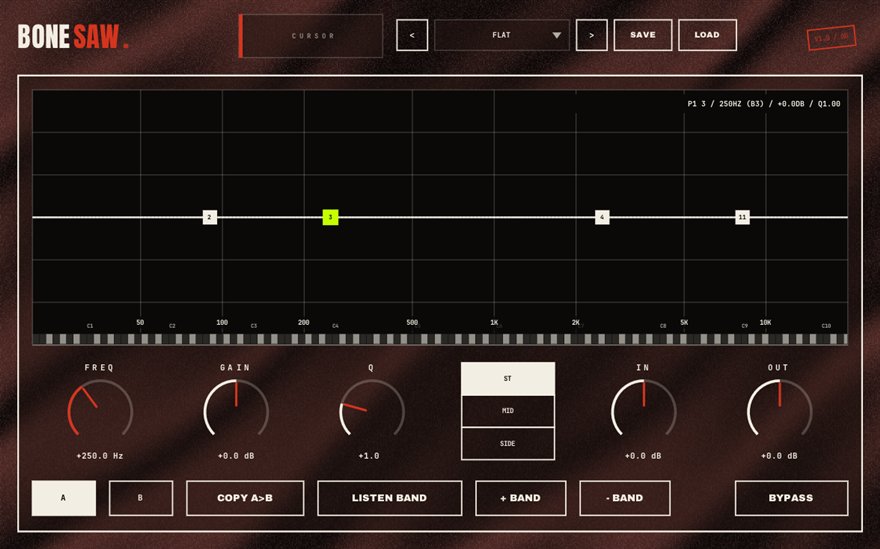
What BONESAW does
BONESAW is an equalizer where the curve is the whole interface. Double-click anywhere on the spectrum to spawn a band, drag it to set frequency and gain, roll the wheel to change Q. Behind the curve runs a live before/after analyzer, so you are always looking at what the EQ is doing to the actual signal rather than guessing from a static line.
Every one of the 12 bands can process the full stereo signal, only the MID (center) or only the SIDE (width) channel. That is what makes it a proper mid/side EQ: you can cut mud from the center where the kick and vocal live while leaving the wide reverb tails alone, or brighten the sides of a beat without touching the lead vocal. A piano-key ruler along the frequency axis lets you EQ in musical notes, which matters when you are chasing a resonance that sits on the key of the song. A/B snapshots let you compare two settings at the same loudness before you commit.
Where a mid/side EQ fits in a hip-hop mix
On a boom-bap beat, BONESAW earns its keep on the mix bus and on sampled loops. Old records carry rumble and hiss in the sides; a SIDE-only high-pass at 120 Hz tightens the low end for club systems without thinning the kick, which sits in the middle. On rap vocals, a MID-only cut around 300 to 500 Hz clears boxiness from the voice while the doubles and ad-libs panned wide keep their body.
For mastering, the piano ruler is the shortcut: if the 808 is tuned to F, you can see the F row and place a narrow band exactly on the fundamental or its octave. Because BONESAW is a VST3 it loads in FL Studio, Ableton Live, Reaper, Studio One, Cubase and Bitwig on Windows, and the standalone build is useful for checking reference tracks outside a session.
How to use BONESAW
- Load BONESAW on the channel. Play the track and watch the live spectrum settle so you can see where energy actually sits.
- Double-click on the curve at the frequency you want to shape. Drag up or down for gain, use the mouse wheel to narrow or widen the Q.
- Set the band's channel mode to MID or SIDE if the problem lives only in the center or only in the width. Leave it on the full signal for ordinary tone shaping.
- Save an A/B snapshot, try a second approach, then flip between them at matched loudness and keep the honest one.
BONESAW features
- 12 fully parametric bands, each switchable between full signal, MID-only and SIDE-only
- Live before/after spectrum analyzer under the curve
- Double-click to add bands, drag to move them, mouse wheel for Q
- Piano-key frequency ruler so you can EQ in notes, not just Hertz
- A/B snapshots for honest, loudness-matched comparisons
- VST3 and standalone builds for Windows 10/11 64-bit, 100 percent free
BONESAW vs the alternatives
How BONESAW compares with the free and paid 12-band M/S parametric EQ plugins producers usually shortlist. The row for BONESAW is highlighted.
| Plugin | Price | Windows formats | Notes |
|---|---|---|---|
| BONESAW (BSMT.DSP) | Free, no signup | VST3, standalone | 12 bands, per-band mid/side, live before/after analyzer, piano-key ruler, A/B snapshots |
| TDR Nova | Free | VST2, VST3, AAX | Dynamic EQ with four bands plus filters. Excellent, but not a per-band mid/side design |
| MeldaProduction MEqualizer | Free (MFreeFXBundle) | VST2, VST3, AAX | Solid general-purpose EQ inside a large free bundle |
| FabFilter Pro-Q 4 | Paid (around USD 179 list) | VST2, VST3, AAX, CLAP | The industry reference. Mid/side, dynamic bands, spectrum grab. This is the paid anchor BONESAW is measured against |
Prices are vendor list prices as seen in August 2026 and change during sales. Formats listed for Windows only.
BONESAW specs
| Plugin | BONESAW (12-band M/S parametric EQ) |
| Category | EQ & FILTERS |
| Price | Free. No account, no email, no trial, no watermark. |
| Formats | VST3 (64-bit) and a standalone app |
| Operating system | Windows 10 / Windows 11, 64-bit. macOS build in progress (the download button switches when it ships). |
| Works in | FL Studio, Ableton Live, Reaper, Studio One, Cubase, Bitwig and any other VST3 host on Windows |
| Installer | One BSMT.DSP installer for all 27 plugins; tick the ones you want. It detects and updates older versions in place. |
| Version | Shown on the download button, fetched live from the releases repository. |
| Developer | Dr.dawgOG (BSMT.DSP), Anand, Gujarat, India |
| Support the project | buymeacoffee.com/dawgog (optional) |
BONESAW FAQ
What is a mid/side EQ and when should I use one?
A mid/side EQ splits a stereo signal into what is common to both speakers (the mid, or center) and what differs between them (the side, or width). You use it when a problem lives in only one of those places: rumble in the sides of a sampled loop, boxiness in a centered vocal, or dull width on a beat. BONESAW lets every band pick full, MID or SIDE.
Is BONESAW really free, or is it a trial?
It is fully free. There is no trial timer, no watermark, no account and no email gate. You download the BSMT.DSP installer from GitHub Releases, tick BONESAW (or the whole suite) and install. If it helps your mixes you can support the basement on Buy Me a Coffee, but that is optional.
Does BONESAW work in FL Studio, Ableton Live and Reaper?
Yes. BONESAW is a 64-bit VST3 plugin, so it works in any VST3 host on Windows 10 or 11: FL Studio, Ableton Live, Reaper, Studio One, Cubase, Bitwig and others. It also installs as a standalone app for use outside a DAW.
Can I use BONESAW for mastering?
Yes. Mid/side bands, a live before/after analyzer and loudness-matched A/B snapshots are exactly the tools mastering engineers reach for. Pair it with CEILING, the free limiter and LUFS meter in the same suite, for a complete free mastering chain on Windows.
Why does the piano-key ruler matter?
Because most low-end problems in hip-hop are musical, not just spectral. If your 808 is in F and a note booms, the ruler shows you the F keys on the frequency axis so you can place a band on the fundamental or its octave instead of sweeping blindly.
Install, SmartScreen and Mac questions are answered on the BSMT.DSP suite FAQ.
More from BSMT.DSP
See all 27 free BSMT.DSP plugins, the guide to mixing rap vocals with free plugins, and the list of free alternatives to paid vocal plugins. Need the vocal mixed by the person who built these? Mixing and mastering is open.